Answer Engines
Perplexity: The AI Answer Engine That Replaces Tab Overload
Perplexity gives concise, citation-linked answers from live web sources, helping you cut tab overload, verify claims fast, and finish research with confidence.
Feb 20, 2026 · 4 min read
Key takeaways
- Answer engines can replace multi-tab skimming with direct, source-linked summaries.
- Perplexity is strong for fast research on current topics with inline citations.
- Citation checks are still essential, especially for high-stakes decisions.
Perplexity: The AI Answer Engine That Replaces Tab Overload
TL;DR
- Stop digging through blue links: AI answer engines provide direct responses instead of only listing websites.
- Perplexity is a top choice for fast summaries with citation links to live web sources.
- Reclaim time: it reduces tab overload and skimming through SEO-heavy fluff.
- Verify quickly: inline citations make source checking much faster.
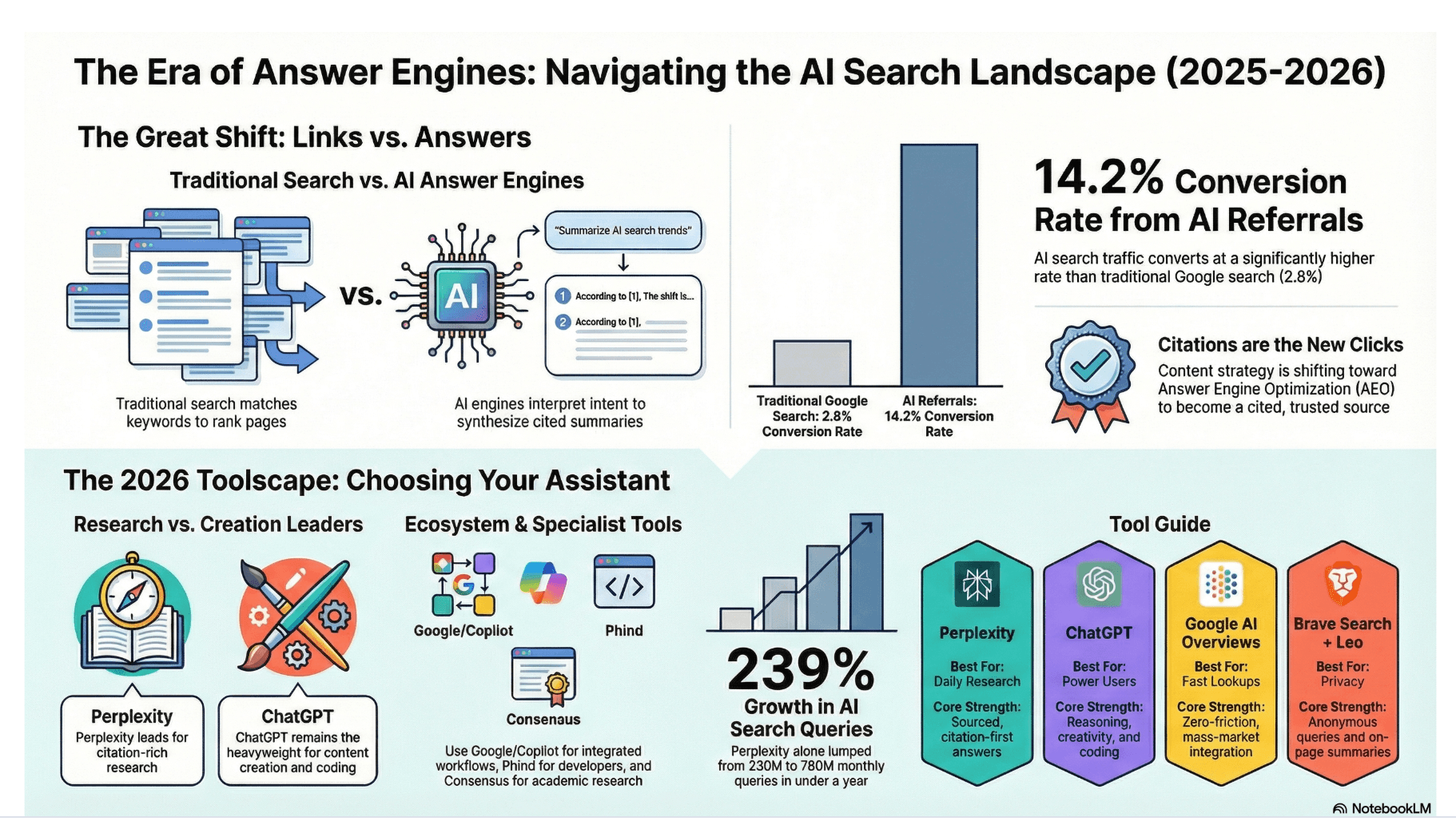
Infographic Snapshot
Quick visual overview of the shift from traditional search to citation-first AI answer engines.
The Problem: Tab Overload and Filter Failure
You ask a specific question, and traditional search gives you a long list of links. That usually starts a cycle of:
- opening tabs
- skimming multiple posts
- piecing a consensus together
This is not a lack of information. It is a filter problem.
Search results often hide answers behind SEO framing, affiliate content, and overly long pages. The result is too much raw data and too little organized insight.
You spend more time filtering than understanding.
This workflow slows down knowledge workers, students, and professionals who need reliable answers quickly. A better system should deliver structured insight first, instead of forcing manual collection.
What Type of Tool Solves This
The category here is AI-powered answer engines. These tools combine web search with language models to generate direct answers.
Typical workflow:
- Input: Ask in natural language.
- Process: The system fetches and reads relevant web pages in real time.
- Output: You get a concise summary plus source links for verification.
This shifts your role from high-effort link collector to reviewer of a coherent answer backed by sources.
Best Pick: Perplexity
Perplexity is an AI answer engine built to provide concise, cited answers from the web. Unlike traditional search engines that return only links, it synthesizes context and surfaces sources in the answer flow.
How It Works
When you ask a question, Perplexity:
- searches the live web for relevant content
- synthesizes key points into natural-language answers
- shows numbered citations that link to source documents
That citation layer is the core feature. It makes claims traceable and keeps the research process transparent.
Who It’s Best For
Perplexity is ideal for:
- knowledge workers who need concise research
- students summarizing complex topics
- writers fact-checking claims
- professionals who want a faster alternative to multi-page skimming
It is especially useful for current or nuanced topics where freshness and quick synthesis matter.
Why It Stands Out for This Use-Case
Perplexity is designed as a real-time answer engine, not just a chat interface. Search and synthesis happen together, so:
- responses are grounded in current web content
- key claims link back to source pages
- verification takes seconds, not multiple tab jumps
This directly addresses two common weaknesses in AI workflows:
- stale or non-live information
- limited source transparency
No tool is perfect, but Perplexity is optimized for research clarity over open-ended conversation.
When It May Not Be Ideal
Perplexity is less useful for:
- very simple lookups (for example, weather or live sports scores)
- deep creative drafting (stories, long-form narrative writing)
- primary-source review in high-stakes legal or medical decisions
Use it for research efficiency, not as a final authority.
Do This Now (10-Minute Setup)
- Visit perplexity.ai (web app first; mobile app optional).
- Ask one clear question, such as: “What are the main health benefits of the Mediterranean diet?”
- Read the summary before opening any links.
- Click numbered citations to verify important claims.
- Ask a follow-up for clarity, such as: “Explain that in simpler terms.”
This routine usually beats the old multi-tab workflow for first-pass research.
Alternatives
ChatGPT with Search
Strong for conversational reasoning and drafting, but generally less centered on inline citation flow.
Google Search
Still excellent for navigation, maps, and finding specific sites, but less efficient for immediate synthesized summaries.
Brave Search (Ask Brave)
A privacy-oriented search option that provides summarized results without user profiling as a core model.
Limitations
Answer engines depend on source quality. If available web content on a niche topic is weak or biased, summaries can reflect that.
Citations improve traceability, but they do not guarantee full correctness.
Some advanced features (for example, deeper search modes) may require paid tiers.
Treat these tools as research assistants. Final judgment still requires source review.
How to Tell It Worked
You will know the workflow improved when:
- you open fewer tabs
- you reach conclusions faster
- you act on information with greater confidence
If this pattern consistently cuts your research time, the tool is doing its job.
Recommended Tool
Perplexity
Use Perplexity when you want a fast, cited summary from live web sources without the manual overhead of traditional search.
Tools mentioned
- Perplexity (affiliate)Why we like it: AI answer engine focused on concise responses backed by linked web citations.
- ChatGPT (affiliate)Why we like it: General-purpose assistant with web search capabilities for conversational research.
- Google Search (affiliate)Why we like it: Traditional search index useful for navigation, discovery, and direct site lookup.
- Brave Search (affiliate)Why we like it: Privacy-focused search engine that includes AI-assisted result summaries.
About the author
AI Shortcuts Team · Workflow researcher
We test AI tools with real calendars, inboxes, and family schedules so you can steal the shortcut without the chaos.
Related posts
Best AI Tool to Monitor a Niche Industry Without Checking 50 Sites
Feedly helps you monitor niche industry sources, filter weak matches with AI, and review only the updates that matter instead of checking dozens of sites daily.

The End of Tab Overload: Why the AI-Native Browser Is Your New Workflow Power Move
AI-native browsers like Comet turn tab-heavy research into agent workflows that summarize pages and complete multi-step tasks, so you spend less time clicking.
Best AI Tool to Turn Your Documents into a Private Podcast
Use NotebookLM to turn PDFs, reports, and notes into podcast-style audio summaries so you can learn during commutes while keeping context and key ideas intact.