Audio Workflows
Best AI Tool to Turn Your Documents into a Private Podcast
Use NotebookLM to turn PDFs, reports, and notes into podcast-style audio summaries so you can learn during commutes while keeping context and key ideas intact.
Feb 15, 2026 · 4 min read
Key takeaways
- Turn long documents into podcast-style audio so you can learn during commutes.
- Use source-grounded summaries to stay focused on your material.
- Follow up with questions to extract actions, risks, or key themes.
- Keep alternatives simple: voice quality (ElevenLabs) vs flexibility (ChatGPT).
Best AI Tool to Turn Your Documents into a Private Podcast
TL;DR
- The Tool: NotebookLM, an AI research workspace built by Google.
- The Use-Case: Convert long PDFs, reports, and notes into podcast-style audio summaries.
- The Benefit: Turn commuting or walking time into structured learning time.
- Who it’s for: Professionals, researchers, and students with more to read than time to read it.
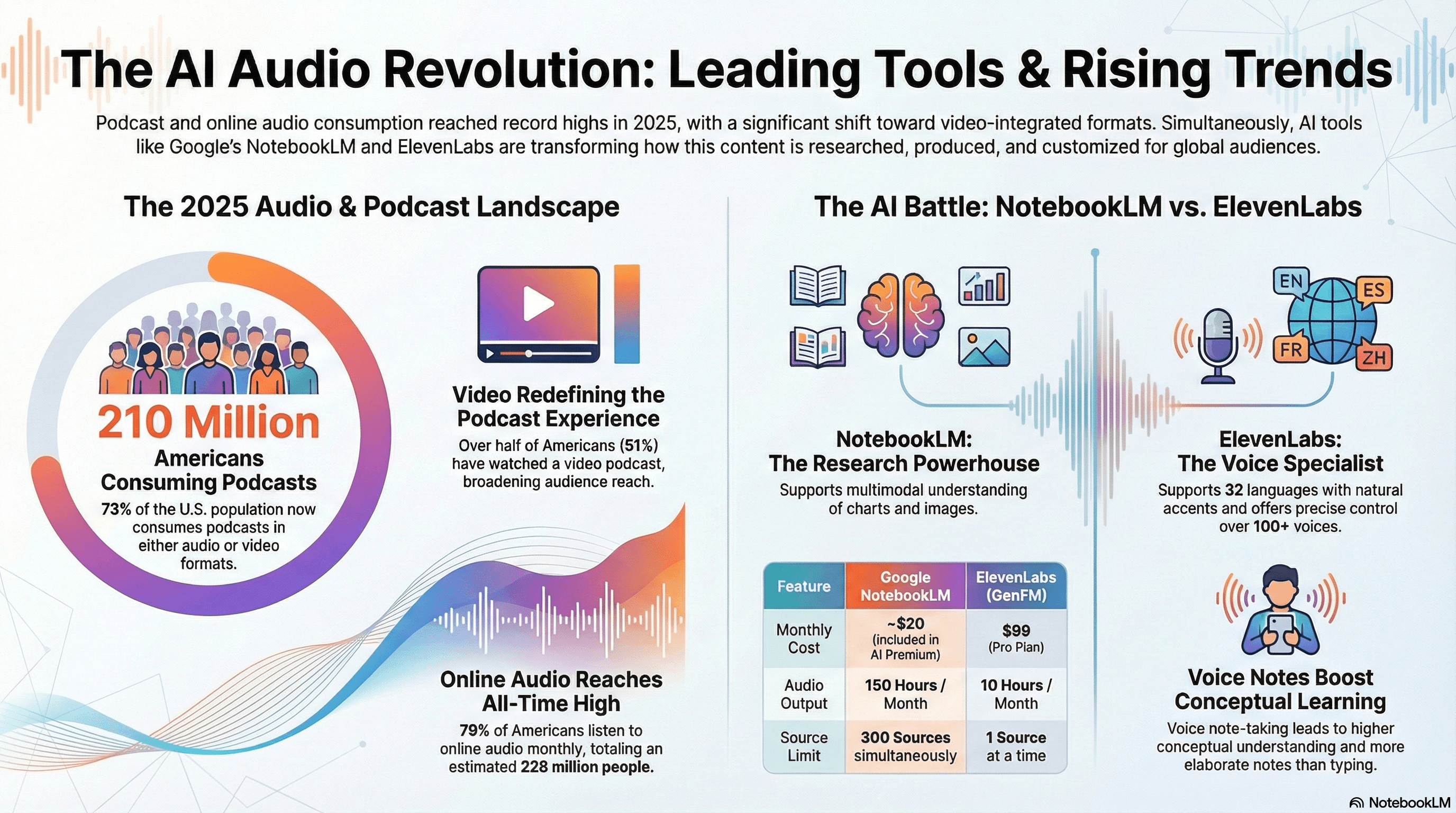
Infographic Snapshot
Quick visual overview of the AI audio landscape and where NotebookLM fits for document-to-audio workflows.
The Problem: The “Reading Debt”
Most professionals carry what you could call reading debt.
Unread reports. Saved research papers. Strategy decks. Long PDFs sitting in a folder called “To Read.”
Reading requires focus. It’s not easy to fit into:
- Commuting
- Walking
- Exercising
- Admin time
Basic text-to-speech tools don’t really solve this.
They simply read every word aloud, including citations and formatting artifacts, which makes long documents harder to follow.
Podcast consumption in the U.S. has reached record highs. More people are choosing audio as a primary way to absorb information.
We don’t just need text read out loud. We need synthesized audio explanations of complex material.
That’s the upgrade: from reading-only to audio-assisted learning.
What Type of Tool Solves This?
A new category is emerging: AI-powered document synthesis with conversational audio output.
These tools analyze your documents, identify themes and structure, connect ideas, and generate a structured audio overview.
Workflow: Upload -> Analyze -> Synthesize -> Generate Audio -> Ask Follow-up Questions
Instead of listening to raw text, you get something closer to a short podcast episode discussing your material.
Best Pick: NotebookLM
NotebookLM is a personalized AI research workspace that works with the documents you upload.
Its standout feature for this use-case is the ability to generate structured, conversational Audio Overviews based on your material.
How the Audio Overview Works
After uploading one or more documents, you can generate a “Deep Dive” audio conversation.
Two AI hosts discuss your material in a structured way. They summarize key ideas, connect themes, and present the content conversationally.
It feels closer to listening to a podcast explanation than robotic narration.
Because it’s based on your uploaded sources, the discussion stays grounded in your material.
Why NotebookLM Over Alternatives?
Grounded in Your Sources
NotebookLM focuses on the documents you upload.
Built for Multi-Document Work
It’s designed to handle multiple related sources inside one workspace.
Integrated Workflow
After listening, you can ask follow-up questions, request citations, extract structured summaries, and turn insights into notes.
When It May Not Be Ideal
- If you only need simple text-to-speech narration.
- If you require detailed control over voice tone or speed.
- If you’re reviewing high-stakes legal or medical documents that demand manual precision.
- If you prefer fully offline tools and don’t want to upload documents to the cloud.
Do This Now (10-minute setup)
- Choose one long document (dense PDF, research paper, internal report).
- Upload it to NotebookLM (new notebook -> add file).
- Check the auto-generated summary for correctness.
- Generate the Audio Overview ("Generate" -> Deep Dive).
- Listen intentionally (treat it like a short podcast episode).
- Ask one follow-up question (assumptions/risks/summary-by-section).
- Extract key notes into a concise bullet summary.
Alternatives
ElevenLabs
Best if your priority is high-quality, customizable voice narration. Not focused on deep document synthesis.
ChatGPT (Plus)
Best for flexible conversations around one or two documents. Less structured for podcast-style multi-document overviews.
Limitations
- Cloud upload required.
- Limited control over host personalities and delivery style.
- Charts/diagrams may not translate perfectly into audio.
- Occasional inaccuracies can occur.
How to Tell It Worked
- You understand core ideas in one listening session.
- You can explain the material without reopening the PDF.
- Your “to-read” folder shrinks.
- Deep reads become faster because you already grasp structure.
Simple test: If you can summarize the document in 60 seconds after listening (without looking), it worked.
Recommended Tool
NotebookLM: Best for turning long documents into structured, podcast-style audio summaries grounded in your own sources.
Use it to upgrade your reading workflow into an audio-first learning system without losing depth.
If you want to extend this workflow, add one recurring review where you compare audio takeaways against the original document and refine your prompts.
Tools mentioned
- NotebookLM (affiliate)Why we like it: Turns your documents into a research workspace with conversational audio overviews.
- ElevenLabs (affiliate)Why we like it: Premium text-to-speech voices; best when voice quality is the priority.
- ChatGPT (affiliate)Why we like it: Flexible chat with voice; useful for smaller document sets and open-ended discussion.
About the author
AI Shortcuts Team · Workflow researcher
We test AI tools with real calendars, inboxes, and family schedules so you can steal the shortcut without the chaos.
Related posts
Best AI Tool to Monitor a Niche Industry Without Checking 50 Sites
Feedly helps you monitor niche industry sources, filter weak matches with AI, and review only the updates that matter instead of checking dozens of sites daily.

The End of Tab Overload: Why the AI-Native Browser Is Your New Workflow Power Move
AI-native browsers like Comet turn tab-heavy research into agent workflows that summarize pages and complete multi-step tasks, so you spend less time clicking.
Perplexity: The AI Answer Engine That Replaces Tab Overload
Perplexity gives concise, citation-linked answers from live web sources, helping you cut tab overload, verify claims fast, and finish research with confidence.