Tool Finder
Best AI Tool to Monitor a Niche Industry Without Checking 50 Sites
Feedly helps you monitor niche industry sources, filter weak matches with AI, and review only the updates that matter instead of checking dozens of sites daily.
Mar 8, 2026 · 5 min read
Key takeaways
- Feedly turns scattered websites, newsletters, and alerts into one reviewable monitoring workflow.
- AI filtering helps reduce low-value matches before they hit your daily reading queue.
- A short setup and a few rounds of refinement usually matter more than adding more sources.
Best AI Tool to Monitor a Niche Industry Without Checking 50 Sites
TL;DR
- Who it's for: Professionals, researchers, and consultants who need to follow a niche industry or topic without living inside newsletters and tabs.
- The goal: Move from manually checking 50+ websites to reviewing a short, AI-filtered list of what actually matters.
- The outcome: A "Google Alerts on steroids" workflow that adapts to your priorities and removes daily noise.
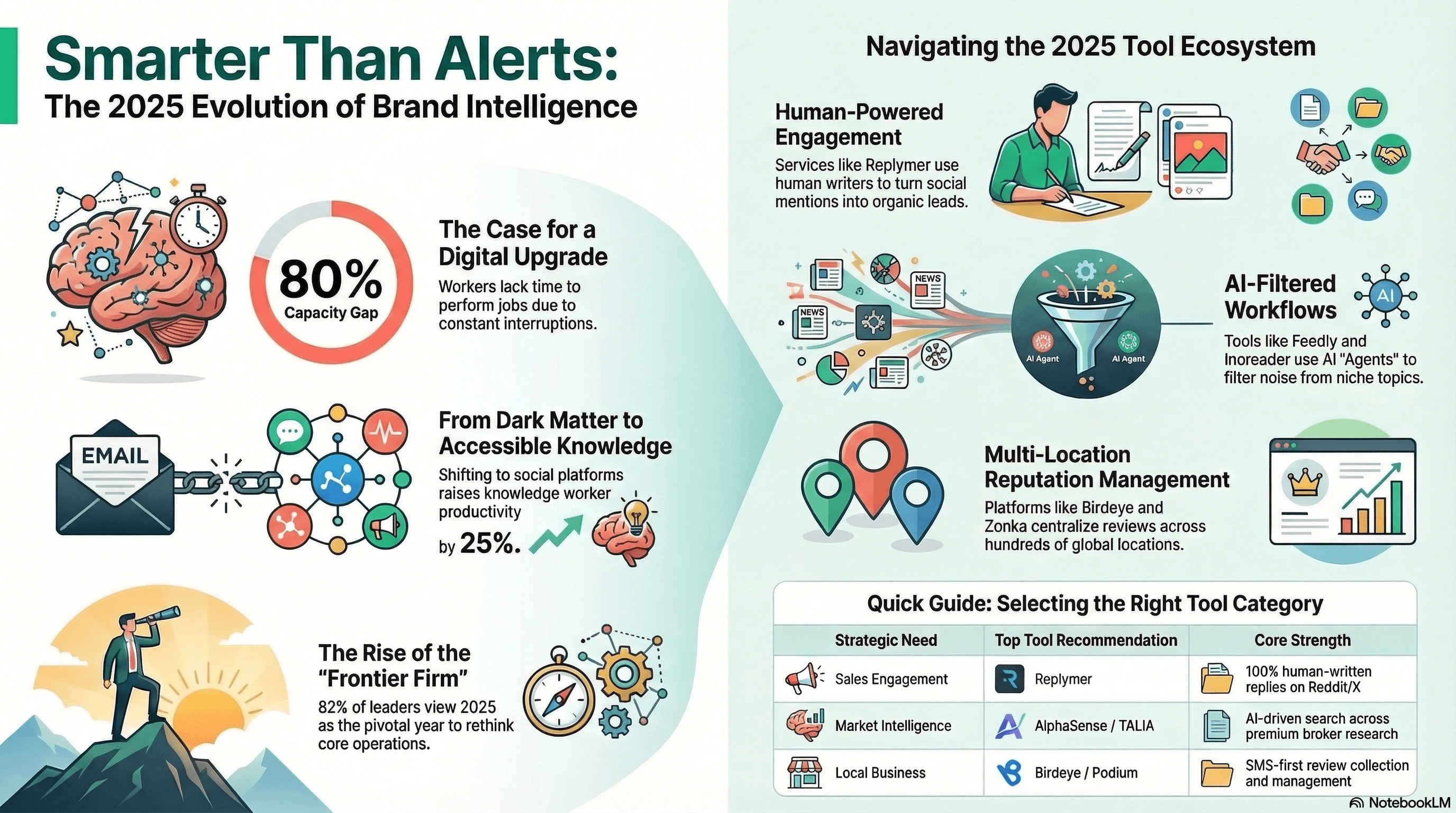
Infographic Snapshot
A simple visual reminder that the value is not more inputs. It is a cleaner workflow for finding what matters faster.
The Problem: Manual Monitoring Does Not Scale
Keeping up with a specific industry sounds manageable until you try to do it consistently.
Most people begin with a few bookmarked sites. Then the list grows into dozens of blogs, trade publications, competitor pages, newsletters, and social feeds that all need checking.
That creates a familiar failure mode:
- too many tabs
- duplicate stories everywhere
- a crowded inbox
- keyword alerts that surface weak matches
The deeper issue is not a shortage of information. It is a messy workflow.
When your monitoring system is fragmented, you spend more time collecting updates than understanding them. That is expensive for people whose real work depends on spotting changes early, separating signal from noise, and acting before the rest of the market catches up.
The result is late awareness, shallow scanning, and constant low-grade anxiety about missing something important.
What Type of Tool Solves This
The right category here is an AI-assisted monitoring tool.
Unlike a basic news reader that shows everything from every source, these tools help narrow the stream based on your actual priorities.
The typical workflow looks like this:
- Input: Connect websites, blogs, newsletters, and sometimes social or market sources.
- AI processing: The system filters incoming content, removes irrelevant items, and highlights stronger matches.
- Structured output: You review a smaller shortlist in minutes instead of manually scanning for an hour.
The point is not to read more. It is to build a repeatable process that lets you read better.
Best Pick: Feedly
Feedly is a monitoring platform that combines websites, RSS feeds, and newsletters in one interface.
Its advantage is that it solves both halves of the job:
- gathering useful sources into one place
- refining the stream so weak matches do not dominate your day
On plans that include its AI assistant, Feedly can prioritize relevant stories, surface hidden topic connections, and reduce the dependence on exact keyword matches.
Why Feedly Works Well for This Use-Case
Feedly is practical because it balances speed with enough structure for real monitoring work.
Source collection is fast
You can paste trusted publication or company URLs and let Feedly detect the feed when one exists. That removes a lot of manual setup friction.
Filtering improves over time
The more you mark useful or irrelevant items, the more the workflow starts to reflect your real priorities instead of generic keyword logic.
The output is review-friendly
You are not staring at the entire web. You are reviewing a controlled set of sources in one place, which improves signal-to-noise compared with broad search alerts.
It is accessible without enterprise overhead
Compared with heavier market-intelligence platforms, Feedly is far easier to start using without a long implementation cycle.
When Feedly May Not Be Ideal
Feedly is not a zero-setup tool.
If you only need to track one simple keyword a few times per year, it may be more system than you need. It also works best after a few rounds of tuning, so the first version of your feed is rarely the final version.
Do This Now (10-Minute Setup)
- Create one folder around a real monitoring need, such as "Competitor Updates" or "AI Trends."
- Add 10 to 20 high-quality sources you already trust.
- Create one AI feed or alert using a focused query, such as "AI agents for customer support" instead of just "AI."
- Review the first batch of results and identify obvious false positives.
- Use "less like this" or exclusions to reduce irrelevant matches.
- Send the shortlist to your team channel if you already use Slack or Microsoft Teams.
- Recheck the feed in 24 hours and refine it again.
That first feedback loop matters more than chasing perfect setup on day one.
Alternatives
Inoreader
Strong choice for power users who want more manual rules, automation, and filtering control across RSS-heavy workflows.
Google Alerts
Best for lightweight, infrequent monitoring. It is free and simple, but often too noisy and inconsistent for serious niche tracking.
Limitations
Feedly is powerful, but it is still limited by the sources you feed into it.
If your source list is weak, the AI output will also be weak. The system also needs a short learning period before the feed starts feeling genuinely high-signal.
Finally, some of the more advanced AI and market-intelligence features are tied to higher-tier plans, so the best version of the workflow may cost more than a simple RSS reader.
How to Tell It Worked
You will know the upgrade is working when:
- you stop manually visiting dozens of sites
- your reading time drops while awareness improves
- you worry less about missing important updates
- you can explain what changed in your niche after a quick daily review
That is the real benchmark: less friction, better awareness, and clearer decisions.
Recommended Tool
Feedly
Use Feedly when you need a practical monitoring system that can collect many niche sources, cut weak matches, and turn scattered updates into one dependable review loop.
Tools mentioned
- Feedly (affiliate)Why we like it: AI-assisted monitoring platform for websites, newsletters, and topic-based feeds.
- Inoreader (affiliate)Why we like it: RSS reader with advanced rules and filtering for users who want more manual control.
- Google Alerts (affiliate)Why we like it: Free keyword alert service for lightweight monitoring across the public web.
About the author
AI Shortcuts Team · Workflow researcher
We test AI tools with real calendars, inboxes, and family schedules so you can steal the shortcut without the chaos.
Related posts

The End of Tab Overload: Why the AI-Native Browser Is Your New Workflow Power Move
AI-native browsers like Comet turn tab-heavy research into agent workflows that summarize pages and complete multi-step tasks, so you spend less time clicking.
Perplexity: The AI Answer Engine That Replaces Tab Overload
Perplexity gives concise, citation-linked answers from live web sources, helping you cut tab overload, verify claims fast, and finish research with confidence.
Best AI Tool to Turn Your Documents into a Private Podcast
Use NotebookLM to turn PDFs, reports, and notes into podcast-style audio summaries so you can learn during commutes while keeping context and key ideas intact.